|
Homeowner’s
Guide To Waterfront Living At: 119 Maple Ridge Drive, Monmouth,
Maine Hosted By: mapleridgelive.com Introduction to The Guide Main Menu Page Menu For a better
View of The Guide switch to “Landscape Format” on handheld
devices. Then view
these Narrated Presentations: o
Presentation
to introduce The Guide o
Presentation on Information, Procedures and Systems And
see How
to use the Owner’s Guide for detailed instruction on using the Guide Use
the Site Map as your “Table
of Contents” or “Index” of information in The Guide and Use the Main Menu and the Page Menus to make selections to Navigate in The Guide. Early Winter
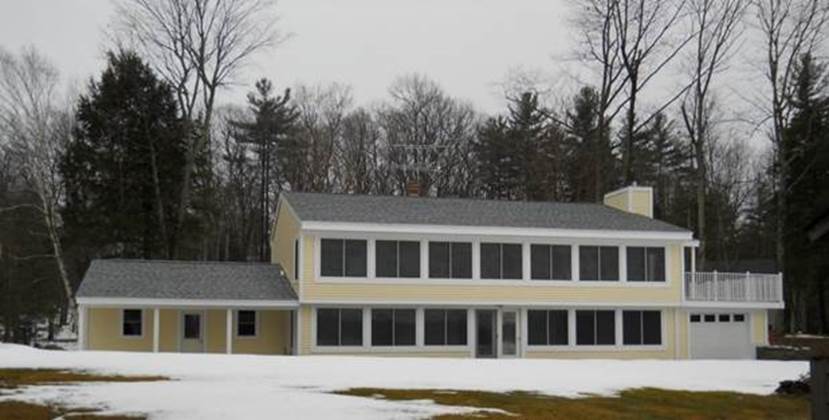
view of North facing Home with Cobbossee Lake behind you
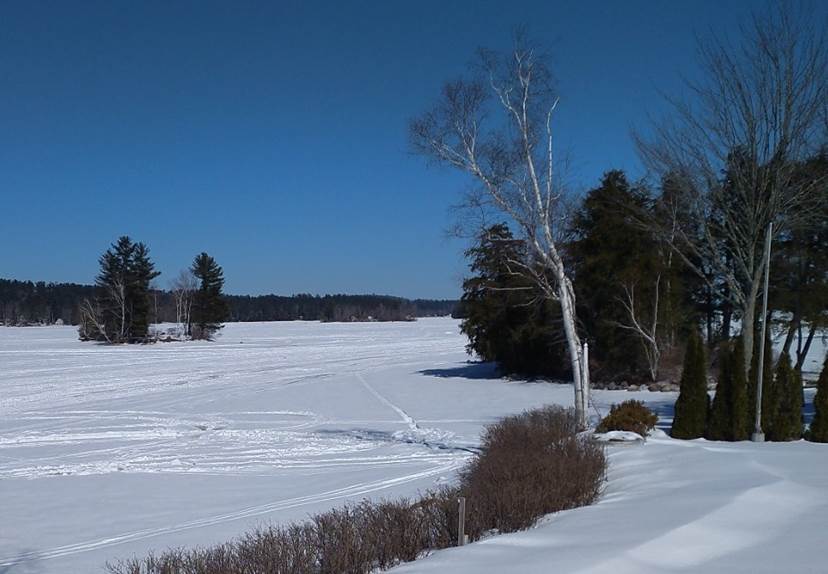
Looking North
up the frozen, snow-covered, Lake from the
Open Deck as seen to the far right of The Home in
the view above.
Welcome to this Introduction to the Owners
Guide, for waterfront living at 119 Maple Ridge Drive Monmouth, Maine. This unique residential, waterfront, island
lot and home, at the very end of Maple Ridge Island, as it projects North out
into Cobbossee Lake is the “Gem of The Island”. The premises location, at the North tip of
the Island, is an extraordinary but private location with water or protected
wetlands on three sides of the home. The Guide shows the home and grounds in
individual views and sets of views played as Narrated Audio Video
Presentations. Static Information is presented as printable, Web and PDF
pages about the home and grounds. Introduction to The Guide About Navigation (Moving about within the Guide) About
Information, Procedures, and Systems About Media
Gallery Presentations Navigation Select
this symbol Δ wherever you see it to return to
the Main Menu at the top of the Page. Select
this symbol <= on
pages that have it to return to the Page Menu which lists selections not on
the Main Menu. See
How to use the
Owner’s Guide for more information about how the Owners guide can be used
and edited. Secondary Windows and Tabs Presentations, External Links, PDF
Documents and some pages open in new Tabs or Pages that will return to the
previous page when closed. Use the Browser “Back Button” to return to
previous pages that open in the primary window. Experience a Narrated Presentation, by
taking this Virtual
Winter Ride Down Maple Ridge Drive
to arrive at a unique home and grounds at the end of the road. At the end of the presentation, close the
Tab or page of your browser and return to this page. Then take a virtual Winter
Walk Around the outside of the Home to capture the look and feel of the
home in the winter months of the year. About Information, Procedures and Systems The Guide is organized
within the three selections from the Main Menu, Information, Procedures
and Systems, with most of the content of the Guide contained within
those three selections. Narrated Presentations
accessed from the Photo Galleries selection on the Main Menu
supplement your experience with the Guide. The same content, as in
most of the Presentations, is also accessible as Printable Web Pages and
related Documents organized under the three selections from the Main Menu
listed above. View The General Description of The Home to see how information in text format is documented in The Guide. The
Information choice opens printable PFF Documents and Web Pages with content
on descriptions, directions, explanations, Lists, Charts, and Graphics about
the home and grounds. The
Procedures selection opens Documents and Pages about the methods, and
instructions, explanations or “Step-by-Step” Lists to manage the Systems of
the Home. Consider doing
regular maintenance on the Hot Tub to change the water. It’s a simple process
that takes some time, but it must be done step-by-step. One of the steps is to reenergize the Hot
Tub after it is refilled. There is a
Procedure for that. To experience how Procedures are formatted, view the Procedure: to
Restart Hot Tub after Down Time for maintenance. The
Systems choice presents the descriptions and definitions of the components
and controls of the selected system.
Consider The Electrical System with dual 200 Amp Main Breaker Panels
and four Sub-panels as critical to a functional home. The Electrical System is completely
documented in The Guide. Select the Presentation
on The Electrical System, and then see how a system is documented in the
Guide by opening the Electrical System. Note that not all systems are as complex as the
Electrical System. About Media
Gallery Presentations Access all Presentations
by selecting Photo Galleries from the Main Menu. All Audio Video presentations are based
on the same format with narrated views automatically sequenced at a moderate
pace. There are Presentations with their own content like Take a Winter Ride Down Maple Ridge
Drive. Other Presentations will have the same
content as Documents and pages in the three other selections from the Main
Menu, Information, Procedures and Systems. G:\MRL\119MRD_WS\Index.htm |
|
|